Client Pull Request Communications
How the GitHub MS Teams Notification integration works for client deployment pull requests.
Before you begin
You need:
- Access
EmpowerMS Team (Access is managed thru Entra ID Security Groups)- Access to UDA Client Deployments channel
- VSCode
- Access to
empowerplatformGitHub Organization- Access to
empower-clientsreports - Access to
empower-tenantrepo
- Access to
- Permission to create branch and submit pull requests
warning
If you are missing any of these prerequisites, then you will not be able to complete the outlined steps
Procedure
-
After creating your changes in your target branch, submit your pull request
-
After submitting your PR(s), the GitHub Notification integration with MS Teams will take care of the notifications sent to the Empower Teams channel UDA Client Deployments
Verify the result
Confirm that:
- The PR Notification Card was sent to the UDA Client Deployments channel
Post Procedures
- If necessary, you can tag PR approvers in the thread for your PR card within the Team channel for escalation
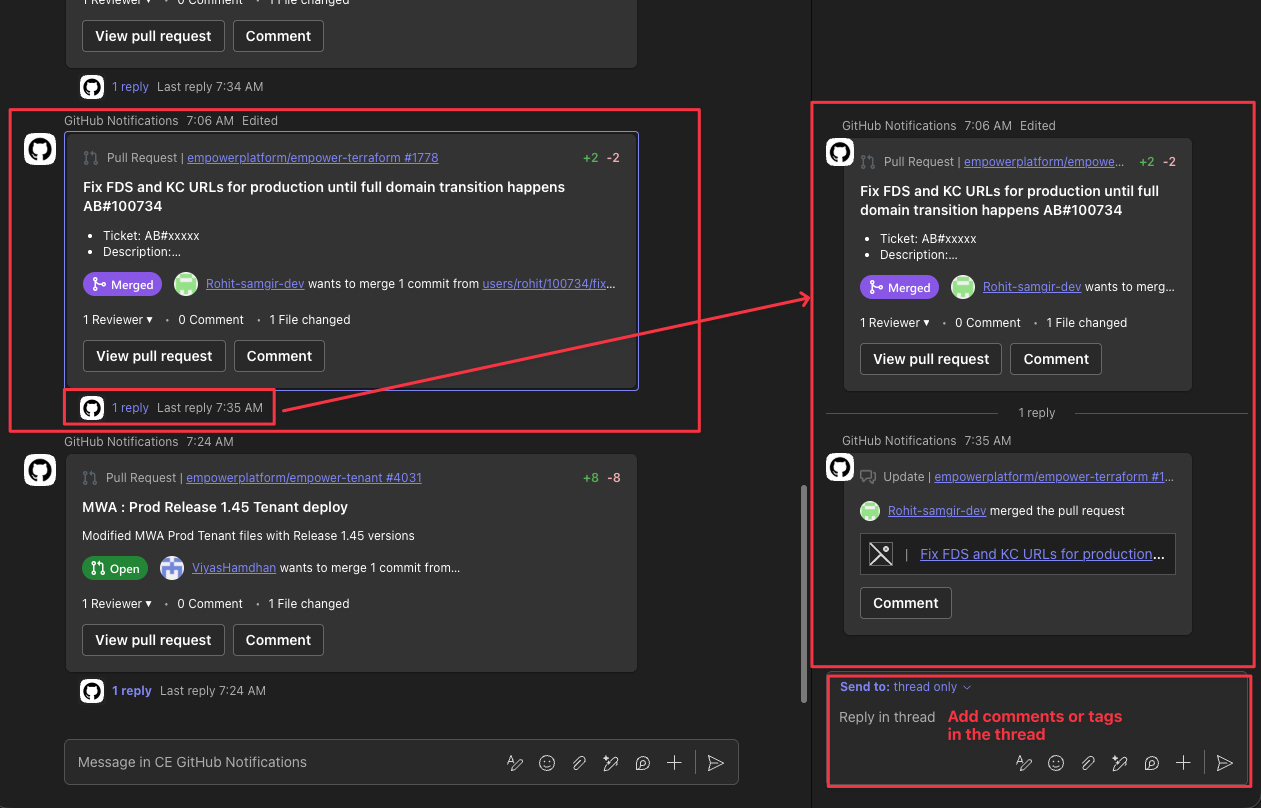 click on image to zoom
Common variations
No variations available