[RBAC] :: Entra groups : Groups claim
PBIs
Context
Clients might have lots of users that should be assigned to multiple different roles. Current design makes that very time consuming since only a single user can be assigned at a time. Thus we have to use Entra group to assign whole groups to a role. There are two possible solutions to this:
- [RBAC] :: Entra groups sync
- Utilize
groupclaim from Entra JWT
Proposed solutions
[RBAC] :: Entra groups sync
Pros:
- Allows role assignment changes to be applied faster
Cons:
- Requires manual or automatic background syncs of the groups with Entra, which might become lots of unnecessary processing.
- Importing specific groups and all of its users might require huge storage over time.
- Whole new feature to implement.
Groups claim
Pros:
- Puts processing on Keycloak's built-in Identity Provider Mappers
- Minimal configuration on Azure AppReg
- Already implemented in Keycloak Terraform
- If client refuses to grant
Groups.Read.Allpermission then we can use only Entra group ids to set role assignment w/o group search by name
Cons:
- Assignment changes affect JWT after re-login is requested
Solution of choice
The most suitable solution at the moment would be groups claim due to much less effort required (only API endpoints and interaction w/ KC), less complexity and operational costs (due to no need to keep syncing)
Proof of concept
- Entra JWT is able to pick up user's group ids and put into
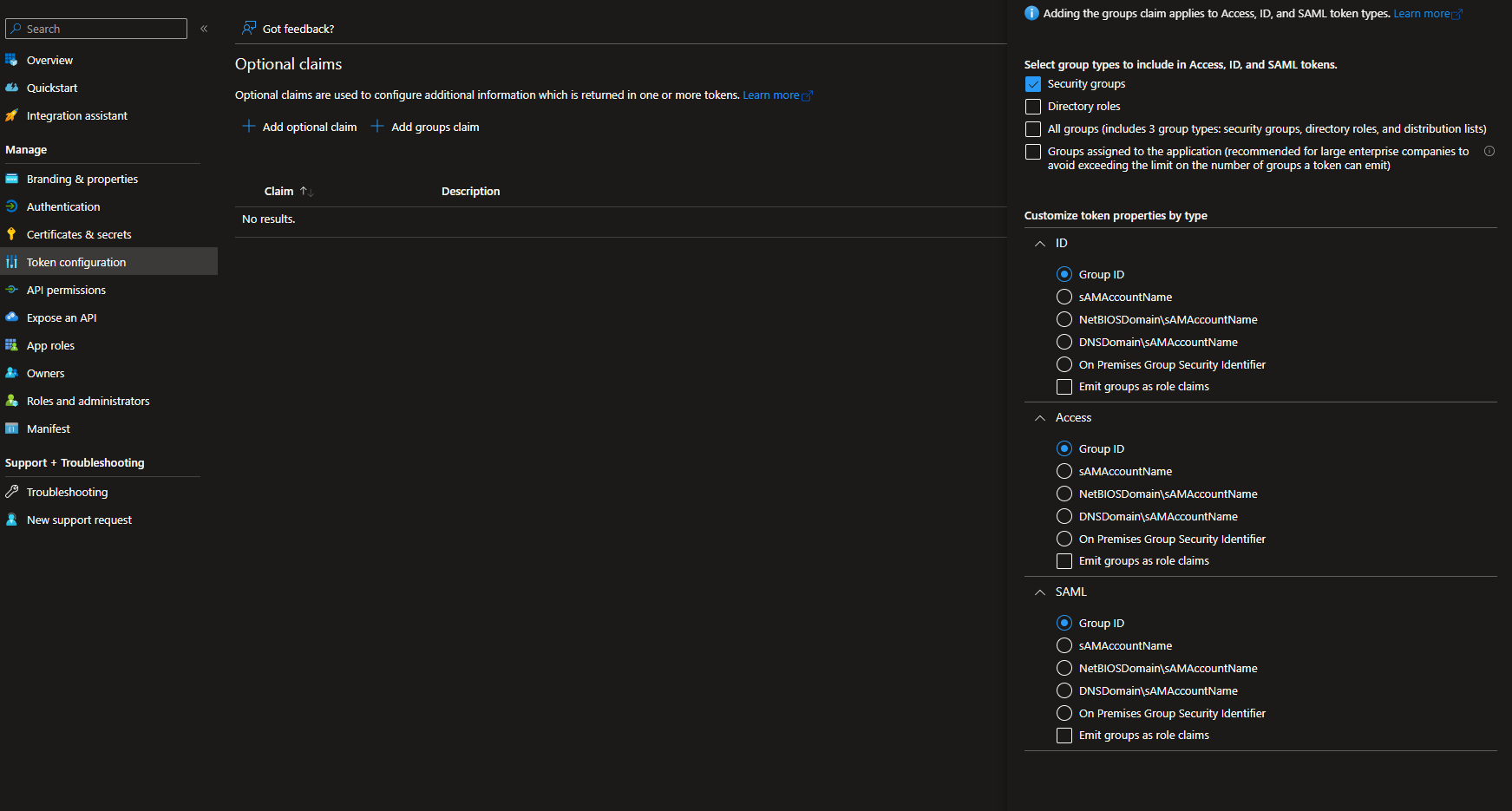
groupsclaim value. This is controlled by AppReg. If the AppReg is multitenant then all on-boarded tenants are affected. Any change to the token configuration is applied in under a minute. groupsclaim holds up to 150-200 groups, which is suitable for us in most scenarios due to narrowing down the filter to use only Security groups. The limitation of 5 groups per token does not affect us because we do not use implicit flow for authentication. (The largest amount of security groups per person in the entire HiSol Entra is 88)- The code below searches for only security groups with name that start with user's input, filtering out all distribution lists and MS365 groups
async Task<List<Group>> GetGroups(string nameFilterInput)
{
    var group = await client.Groups.GetAsync(param =>
    {
        param.Headers.Add("ConsistencyLevel", "eventual");
        param.QueryParameters.Filter =
            $"startswith(displayName, '{nameFilterInput}')" +
            " and not(groupTypes/any(x: x eq 'Unified'))" +
            " and mailEnabled eq false" +
            " and securityEnabled eq true";
        param.QueryParameters.Count = true;
    });
    return group?.Value ?? new();
}
Pre-requisites
- Target tenant has granted
Groups.Read.Allpermissions to AppReg - Getting
groupsclaim in token requires configuring Azure AppReg:- Go to AppReg that is used for Single Sing-On
- Go to Token Configuration
- Click "+Add groups claim"
- Select only Security groups
- Select "Group ID" for all token types