Batch Extraction Migration Guide
Introduction
This document provides a step-by-step guide for migrating existing data sources from legacy extraction (Non-Batch Extraction) methods to batch extraction in Empower. This migration will help reduce Azure Data Factory (ADF) costs for clients.
Objective
As a developer, I want to move my existing data sources to run via batch extraction so that I can greatly reduce the cost in Data Factory for my client.
Overview of Batch Extraction Migration
If any data extraction is currently happening in a legacy system, it needs to be migrated to batch extraction. This ensures that the ADF cost is nullified by leveraging Spark batch-based processing.
Supported Batch Extraction Sources in Empower
The following data sources are supported for batch extraction:
- SERVICE_NOW
- ARGUS
- CDATAJDBC
- KRONOS
- AZURECOSTS
- AZURE_DEVOPS
- ATTENDANCE_ON_DEMAND
- MICROSOFT_ACCESS
- GUILD_QUALITY
- FIVE9
- AZURE_DATA_LAKE_STORAGE
- FACEBOOK_ADS
- WORKDAY
- WORKDAY_RAAS
- GOOGLE_ANALYTICS
- TEXTURA
- KAFKA
- AZURE_EVENT_HUBS
- DYNAMICS_CRM
- DYNAMICS_FO
- DYNAMICS_SYNAPSE_LINK_FO
- DYNAMICS_SYNAPSE_LINK_CRM
- DATAVERSE
- DATABRICKS
- BIRDEYE
- SAP_SAC
- ORIGAMI
- PRIMAVERA_P6
- NET_SUITE
- AZURE_SQLSERVER
- SALESFORCE_JDBC
- MYSQL
- POSTGRESQL
- CLMA
- MICROSOFT_ENTRA
- SNOWFLAKE
- FTP_SERVER
Identifying Non-Batch Extraction Sources
- The existing sources currently running on Non-Batch extraction must be identified.
- In ADF, the naming conventions for extraction versions are:
- Non-Batch Extraction:
v1 - Batch Extraction:
v2
- Non-Batch Extraction:
- Once the source is identified, update the batch extraction version in the database.
Updating Batch Extraction Version in StateDB
To ensure batch extraction is used, update the state_config.DatabaseToStepCommand table using the following SQL query:
UPDATE state_config.DatabaseToStepCommand
SET batchversion = 'v2'
WHERE databaseid = 'YourDatabaseID'
AND commandid = 'YourCommandID';
This change will ensure that the respective source will be extracted using batch extraction moving forward.
UI Changes
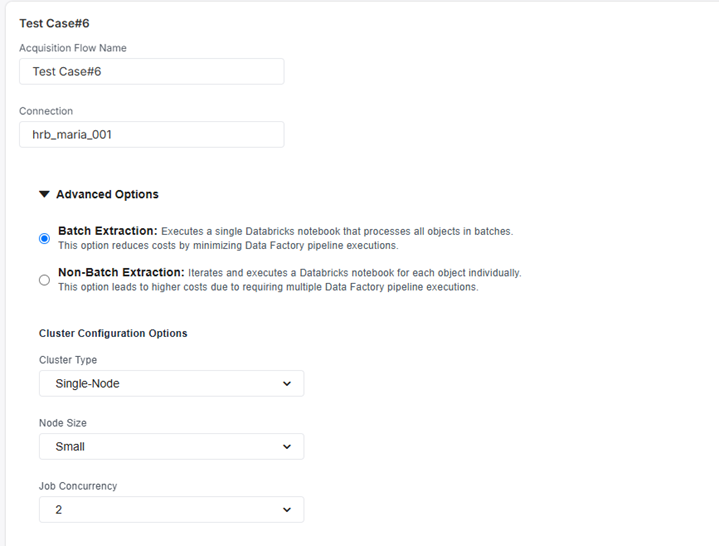
If you are setting up the new connection from Empower UI, then you need to follow the below steps.
For such cases:
-
Edit the connection settings in the Data Acquisition module.
-
Change the extraction type to Batch Extraction in the Empower UI.
-
Conclusion
Following the above steps ensures that data sources previously running on legacy extraction methods are successfully migrated to batch extraction, significantly reducing costs in ADF.