Technical Design Specifications
1. Introduction
Config Promotion provides an interface for users to migrate data from a source environment to a target environment. It allows safe data promotion between environments with options for users to preview, commit, or rollback the migration process.
1.1 Purpose
This document outlines the architecture, logic, states, and interactions for implementing the Config Promotion feature. It serves as a guide for developers, architects, and QA engineers involved in the development and testing of this feature.
1.2 Scope
The scope of this TDS includes the design and implementation specifics for the Config Promotion feature, detailing API interactions, states, and flow sequences.
1.3 Definitions, Acronyms, and Abbreviations
Config promotion - a data migration tool that allows users to merge data from a source environment into a target environment.
Source environment - the environment from which data is being migrated.
Target environment - the environment into which data is being migrated.
Promotion filters - these are the input parameters that users can use to filter the data that will be migrated. This includes filtering by promotion groups and individual records from a group identified by global ids.
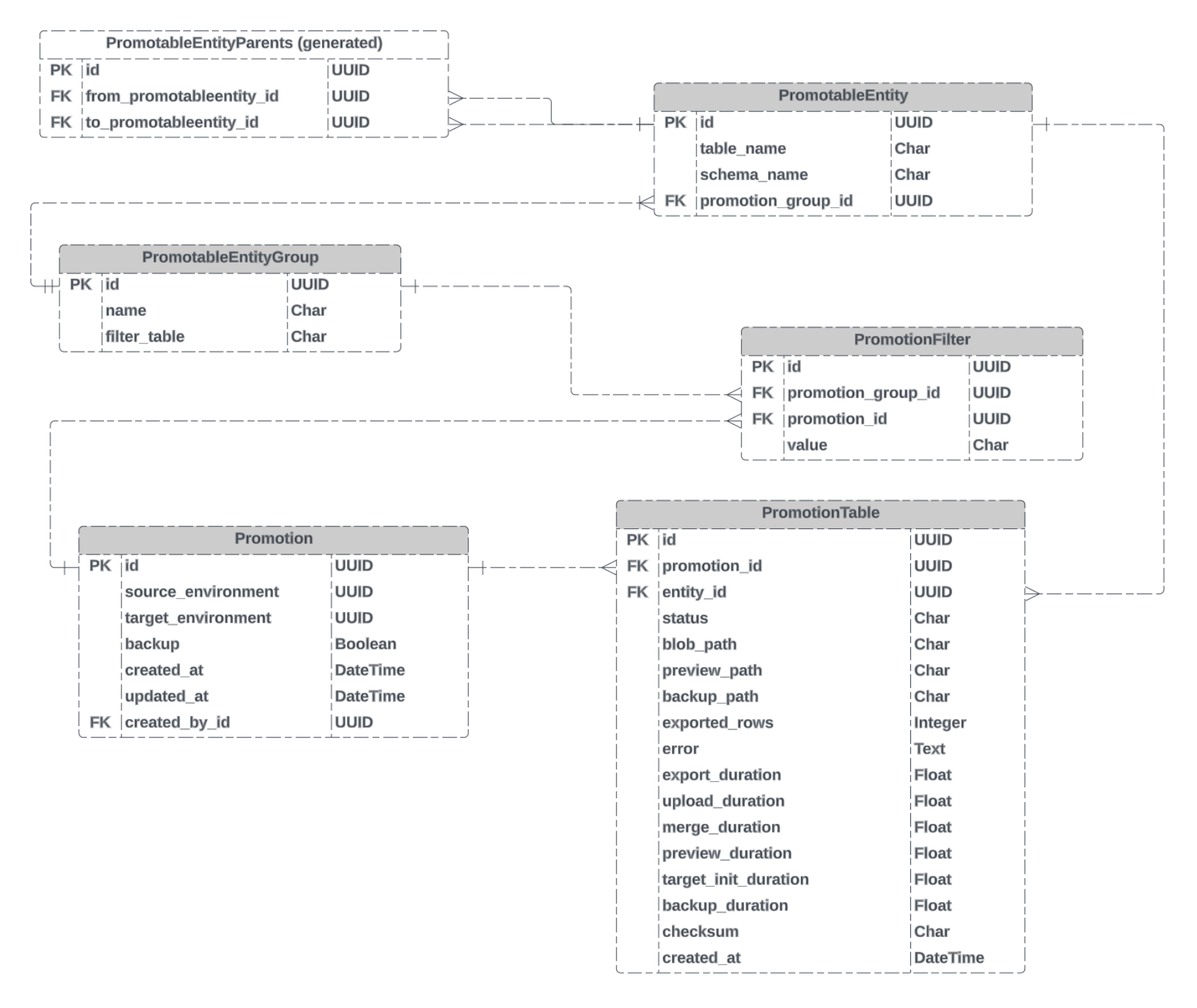
Promotion groups - a group of database tables (promotable entities) that are related to each other. The groups are defined as a dependency tree, for example "source" group contains [state].[FieldList] table that depends on [state].[ObjectList] (via foreign key). This hierarchy is used to determine the order in which the data is migrated. Currently we have two groups:
- Source group - contains all the tables that are related to the
[state_config].[DatabaseList]table (but does not include[state_config].[DatabaseList]table itself) - Model group - contains all the tables that are related to
[model].[Model]table.
Groups and promotable entities are managed via django admin where users can define new groups and add/remove promotable entities from existing groups.
Promotion entities - a representation of the real database table that can be included in the promotion process. It consists of the schema and table name as well as the parent tables relationships (via self-reference foreign key) and the reference to the Promotion group it belongs to.
Filter values - global ids of the the top-level record that will be migrated. For example, if the user wants to migrate a single [model].[Model] and all the related data that has a foreign key referencing this record, the user would specify the global id of the model in the filter values.
Promotion record - This a single instance of a config promotion. It contains the promotion filters and the promotion groups that will be migrated. The promotion is stored on source environment. It also includes the metadata about the migration (i.e. who created it, when it was created, etc., current state).
Config promotion preview - when creating a new config promotion, users can preview the data that will be migrated before the migration is executed. Preview is a csv file that contains the actions that will be performed on the target environment (i.e. insert/update/delete) and the data that will be inserted/updated/deleted. Promotion preview can be discarded or committed (merged into the target environment).
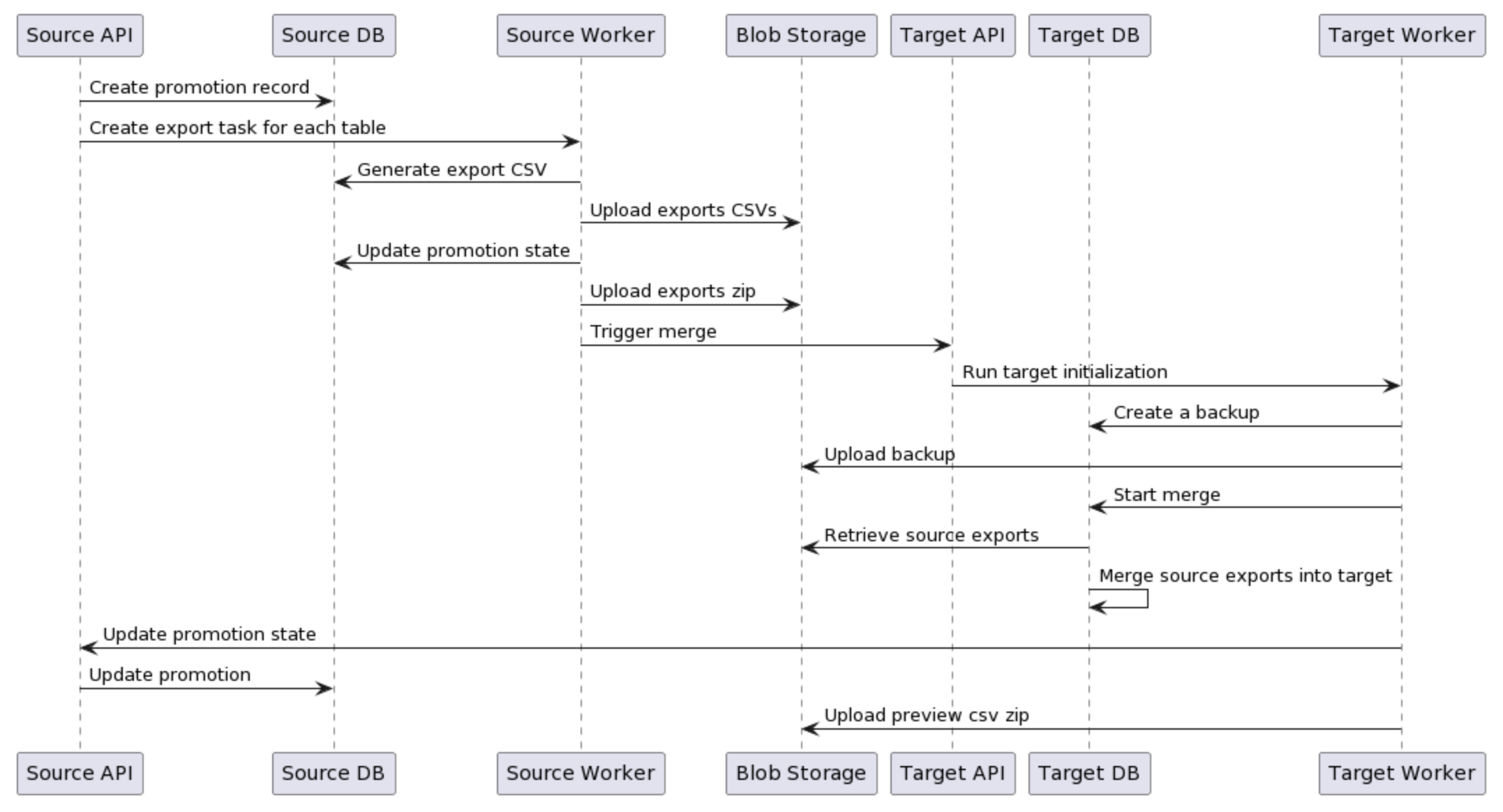
Export - a process of exporting the data from the source environment into a csv file and uploading it blob storage. Files in blob storage are called "export files".
Commit - a process of committing of the existing promotion preview from the export file into the target environment. Commit works only for the promotions that are in the PREVIEW_COMPLETE status. Commit merges existing promotion preview export files into target database.
Rollback - a process of returning the target environment to the state before the promotion was executed. This is done by restoring the target environment from a CSV backup.
Merge - a process of merging the data from the export file into the target environment. Merge retrieves the export csv file from blob storage and applies the changes to the target database.
Source promotion - not to be confused with source environment, a promotion for [state_config].[DatabaseList] table. This is a special case of a config promotion - the promotion of sources is always one way, there's no rollback, preview or merge. Since creation of sources is quite complex (it involves execution contexts, KeyVault secrets, etc.), source promotion is executed as a separate process using it's own API endpoint.
Previous promotion - a promotion that was executed before the current promotion. This is an important part of merge process. The previous promotion is defined as a promotion with the same target environment, for the same table/schema and with the MERGE_COMPLETE state. The filters should be either the same as on current promotion or the superset of the current promotion filters.
2. System Architecture
2.1 Overview
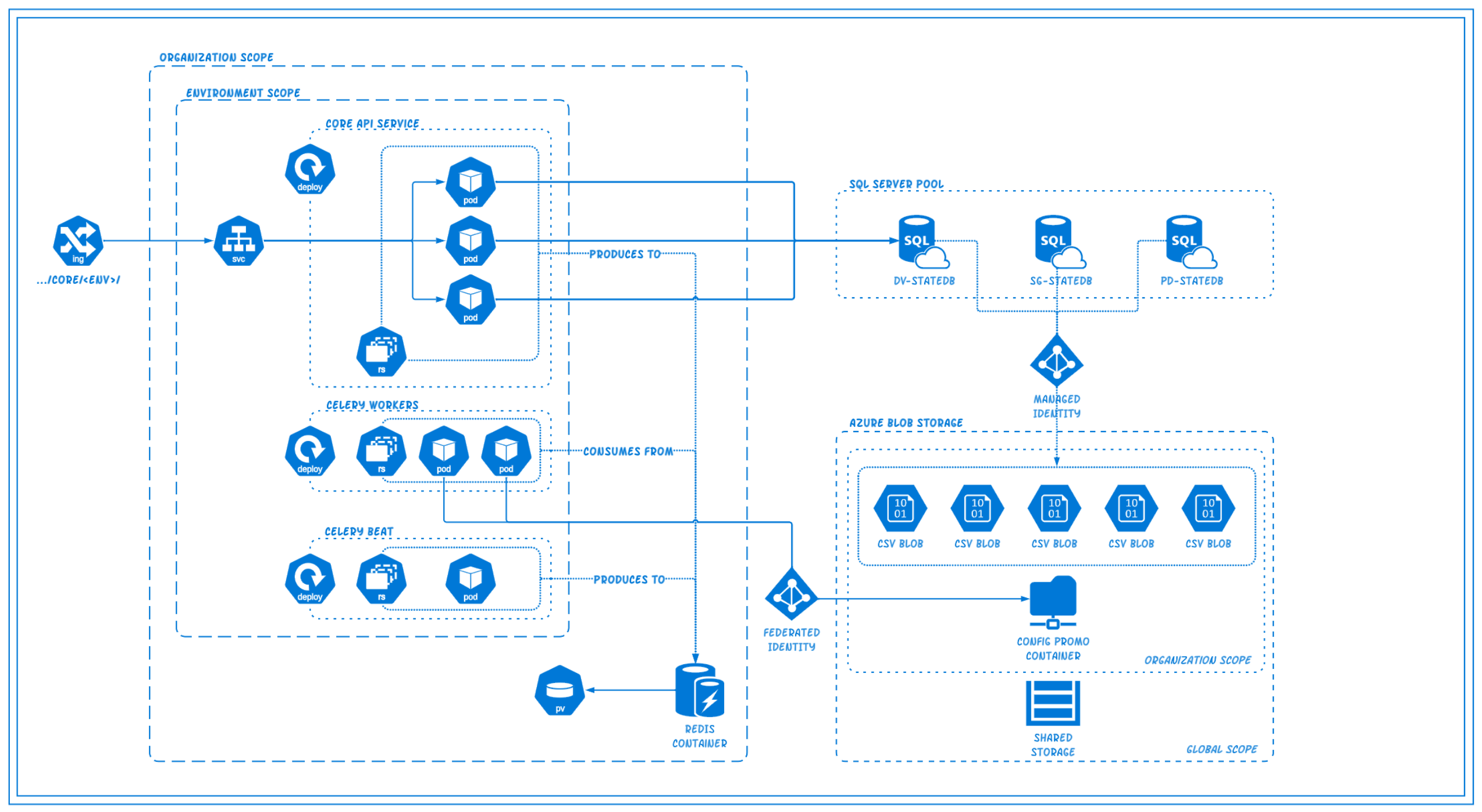
The system is divided into two primary environments: Source and Target. The Config Promotion process involves exporting data from the Source environment, preparing it for promotion, and then merging it into the Target environment. There's a supporting system, Blob Storage, for storing the intermediate data.
2.2 System Diagram
3. Infrastructure Requirements
3.1 Implementation Requirements for Azure System Setup
Azure Managed Identity:
- Implementation: Set up an Azure Managed Identity for Azure services to authenticate themselves to other Azure services.
- Purpose: This eliminates the need for storing and managing credentials in applications or databases. The Managed Identity is also used to authenticate the Azure SQL service to access Blob Storage, preventing any direct exposure of access keys.
Azure Blob Storage & RBAC:
- Implementation:
- Establish an Azure Blob Storage account and create a designated storage container within that account.
- Apply Role-Based Access Control (RBAC) on the Blob Storage to assign the Managed Identity a "Storage Blob Data Contributor" role.
- Purpose: To store data like database backups, logs, exports, etc. securely and at scale while ensuring only authenticated services/users have the right permissions.
Azure SQL Database & Master Key:
- Implementation:
- Provision an Azure SQL Database: (This is usually done via the Azure portal or Azure CLI)
- Set up a master encryption key for the database:
CREATE MASTER KEY ENCRYPTION BY PASSWORD = 'Your_Strong_Password_Here';
- Integrate the Database Scoped Credential utilizing Managed Identity:
CREATE DATABASE SCOPED CREDENTIAL AzureManagedIdentityWITH IDENTITY = 'MANAGED IDENTITY';
- Integrate the External Data Source
CREATE EXTERNAL DATA SOURCE ConfigPromoStorageWITH (TYPE = BLOB_STORAGE,LOCATION = '${CONTAINER_URL}',CREDENTIAL= 'ManagedIdentityStorageCredential');
Separate Database Users for API and Celery Workers:
-
Implementation:
-
Create a database user specifically for the API containers with ONLY read-write permissions:
-- Names here are purely descriptive, use whatever naming convention is consistent with current practicesCREATE USER sqlclientadmin WITH PASSWORD = 'StrongPassword'; -- or use AAD SP FROM EXTERNAL PROVIDEREXEC sp_addrolemember 'db_datareader', 'sqlclientadmin';EXEC sp_addrolemember 'db_datawriter', 'sqlclientadmin'; -
Establish a separate database user for the Celery workers:
-- Step 1: Create the 'CeleryWorker' user with a strong password.CREATE USER CeleryWorker WITH PASSWORD = 'StrongPassword';-- Step 2: Grant general read/write permissions.EXEC sp_addrolemember 'db_datareader', 'CeleryWorker';EXEC sp_addrolemember 'db_datawriter', 'CeleryWorker';-- Step 3: Grant EXECUTE permissions on specific stored procedures essential for Celery tasks.GRANT EXECUTE ON OBJECT::dbo.BulkInsertDataIntoTempTables TO CeleryWorker;GRANT EXECUTE ON OBJECT::dbo.MergePromotableData TO CeleryWorker;GRANT EXECUTE ON OBJECT::dbo.MergeSourceIntoTarget TO CeleryWorker;GRANT EXECUTE ON OBJECT::dbo.PrepareDataForExport TO CeleryWorker;-- Step 4: Grant ALTER on the relevant schemas needed to run the stored procedures aboveGRANT ALTER ON SCHEMA::dbo TO CeleryWorker;GRANT ALTER ON SCHEMA::state TO CeleryWorker;GRANT ALTER ON SCHEMA::state_config TO CeleryWorker;GRANT ALTER ON SCHEMA::model TO CeleryWorker;-- Step 5: Grant CREATE TABLE permission in database, grant view definition (to see records in sys.database_scoped_credentials and sys.external_data_sources, and grant database-scoped bulk operationsGRANT CREATE TABLE TO CeleryWorker;GRANT VIEW DEFINITION TO CeleryWorker;GRANT ADMINISTER DATABASE BULK OPERATIONS TO CeleryWorker;
-
Azure Key Vault:
- Implementation: Integrate Azure Key Vault for managing and storing secrets like the database master key.
- Purpose: Enhance security by centralizing the management of secrets, keys, and certificates, making secret retrieval seamless and secure.
External Data Source for SQL:
- Implementation: Establish an External Data Source on the SQL Database pointing to Blob Storage.
- Purpose: Facilitate direct data read/write operations from/to Blob Storage, streamlining data management.
Federated Identity for Kubernetes Pods:
- Implementation: Implement Federated Identity for the API/Celery workers in the Kubernetes cluster.
- Purpose: Provide a unified identity management solution, allowing external identity providers to authenticate users or services securely.
3.2 Rationale Behind Choices
Azure Managed Identity:
- Why: Storing and managing service credentials manually can pose serious security risks, including unintentional exposure. Managed Identity eliminates this by providing an identity to Azure services, ensuring safer and more manageable authentication.
Azure Blob Storage & RBAC:
- Why: Blob Storage offers a scalable and secure solution for storing large datasets. Implementing RBAC ensures that only the required Azure services or users gain access, thus preventing unauthorized data access.
Azure SQL Database & Master Key:
- Why: A managed database service like Azure SQL offloads administrative burdens while delivering scalability and security. Using master keys ensures sensitive data and other keys are encrypted, enhancing security. The master key is required for encryption of data flow.
Azure Key Vault:
- Why: Directly handling secrets in applications or databases is a security risk. Azure Key Vault provides a centralized, secure, and controlled way to manage secrets, keys, and certificates.
External Data Source for SQL:
- Why: Direct data interactions between SQL Databases and Blob Storage streamline operations and eliminate intermediary steps, making data operations more efficient.
Separate Database Users for API and Celery Workers:
- Why: Different components of the system have distinct responsibilities. By providing separate users with specific permissions, we ensure that each component only performs tasks it's explicitly authorized to do, enhancing security and aiding in audit trails.
Federated Identity for Kubernetes Pods:
- Why: As systems scale and become more distributed, managing individual identities becomes complex. Federated Identity consolidates identity verification, making it more secure and efficient.
3.3 Recommendations, Concerns, Considerations
- Bulk Operations: Granting the
ADMINISTER BULK OPERATIONSpermission is essential for operations that involve large amounts of data. However, be cautious. This permission allows the user to read files from the machine hosting SQL Server. It's crucial to ensure the security of these files and limit access to trusted users. - Stored Procedures Access: Only provide
EXECUTEpermissions on stored procedures that are absolutely necessary for each user. This follows the principle of least privilege, ensuring users can only perform actions essential to their role. - Review and Audit: Periodically review granted permissions and roles. Ensure that only necessary permissions are granted and remove any outdated or unused permissions.
- Error Handling in Stored Procedures: Make sure that the stored procedures have proper error handling. This way, if a procedure fails, the error messages do not leak sensitive data or provide hints to potential attackers about the database structure.
- Logging: Implement logging mechanisms to track when stored procedures are executed, especially if they deal with sensitive operations or data. This aids in monitoring, auditing, and security.
4. Data Design
4.1 Entity Definitions
4.2 Entity Relationship Diagram
4.3 Sequence Diagram
5. Interface Design
5.1 External Interfaces
- Creating a Promotion: The following contracts depict the variations on promotions based on whether the user wants to filter the metadata being promoted, whether they want to be able to rollback/revert a promotions, or whether they would like to preview the promotion prior to committing/merging.
📘 In the contracts below, you will see "backup" marked as True in every case. The Rollback case is not shown here as it is True by default and should be considered carefully before marking as False. Click HERE for more details.
-
CASE 1: Promotion of ALL metadata IN ALL PromotableGroups:
-
// PREVIEW{"environmentId": "<environment_global_id","filters": [],"commit": false,"backup": true}// NO PREVIEW{"environmentId": "<environment_global_id","filters": [],"commit": true,"backup": true}
-
-
CASE 2: Promotion of ALL metadata IN PromotableEntityGroup(s):
-
// PREVIEW{"environmentId": "<environment_global_id","filters": [{"groupId": "<promotable_group_global_id>","values": [],},],"commit": false,"backup": true}// NO PREVIEW{"environmentId": "<environment.global_id","filters": [{"groupId": "<promotable_entity_group.global_id>","values": [],},],"commit": true,"backup": true}
-
-
CASE 3: Promotion of FILTERED metadata IN PromotableEntityGroup(s):
-
-
-
// CASE 5: Promote FILTERED GROUP(s), PREVIEW (i.e. choosing which root level entity(s) to filter on){"environmentId": "<environment.global_id","filters": [{"groupId": "<promotable_entity_group.global_id>","values": ["<promotable_entity.global_id>","<promotable_entity.global_id>","<promotable_entity.global_id>"],},],"commit": false,"backup": true}// CASE 6: Promote FILTERED GROUP(s), NO PREVIEW (i.e. choosing which root level entity(s) to filter on){"environmentId": "<environment.global_id","filters": [{"groupId": "<promotable_entity_group.global_id>","values": ["<promotable_entity.global_id>","<promotable_entity.global_id>","<promotable_entity.global_id>",...],},...],"commit": true,"backup": true}
-
-
For more details see Implementation Details
5.2 Internal Interfaces
Detail the interfaces between internal components.
5.3 User Interfaces (if applicable)
Screenshots/mockups and descriptions of any user interfaces.
6. Algorithm Design
Describe any algorithms or logic flows (in pseudocode or flow diagrams).
7. Security Considerations
Discuss authentication, authorization, encryption, and other security concerns.
8. Scalability and Performance
8.1 Monitoring and Metrics
What metrics will be considered as KPIs and why?
8.2 Tracing and Observability
Explanation of what kind of tracing should be included if relevant for detailed monitoring explained above.
9. Error Handling
Detail how errors and exceptions are handled, logged, and potentially surfaced.
10. Testing Plans, Behaviors, and Considerations
Discuss what needs special attention in testing, and potential challenges.
11. Dependencies
List any dependencies, libraries, or frameworks needed.
12. Deployment and Rollout Plan
12.1 Feature Flagging
Discuss how features will be controlled and gradually rolled out.
12.2 Deployment Steps
Detail the steps for deploying the system or feature, including any rollback procedures.
12.3 Forecasts
Discuss expected growth, usage, or other metrics that might influence the rollout.
13. Future Considerations
Describe aspects not covered in the current design but may be relevant in the future.
14. Appendices
Include any supplementary material, references, or further readings.