Training and Resources
Databricks Certifications
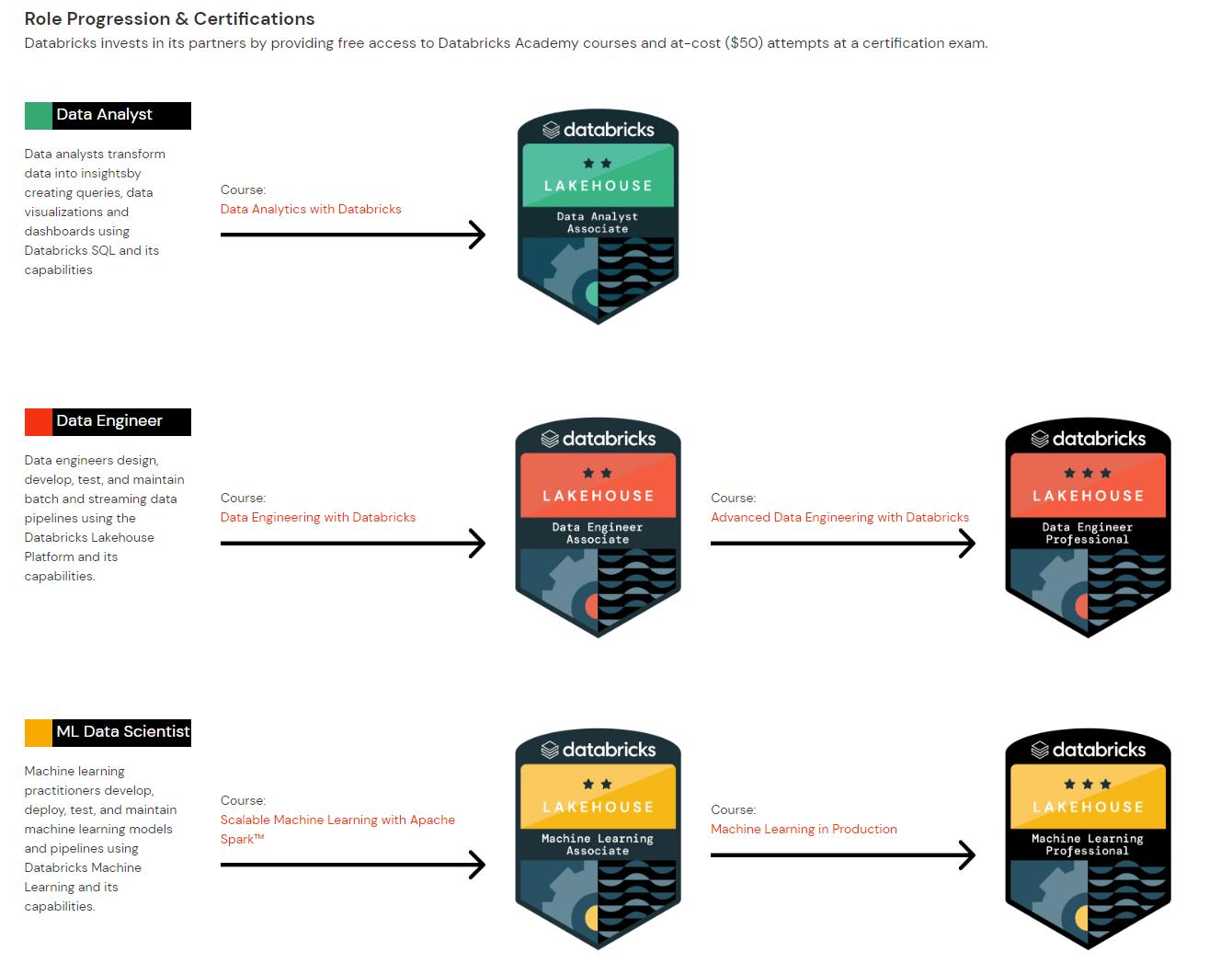
In our group, we are asking that certain roles complete the following Databricks training. However, other roles can certainly get training and take the classes for free!
| Role | Requirement |
|---|---|
| Data Engineer / Architect | Data Engineer Professional |
| Data Scientist / AI Engineer | Machine Learning Professional AND Data Engineer Professional |
To access the training materials for Databricks:
- Register at https://partner-academy.databricks.com/learn
- Navigate to https://partner-academy.databricks.com/learn/catalog and find the relevant course for each of the badges below.
- Walk through the materials on the course -- please let your manager know if you can use additional help with any of the concepts.
- Create a Webassessor account at https://webassessor.com/databricks
- Once you are ready to take an exam, request a discount voucher for your test:
- Go to the Databricks Help Center Form
- Provide the requested information:
- For Training Issue, select 'Certifications'
- For Subject, please type 'Partner Certification Voucher Request - [Certification Name]"
- For Message, please type 'I am with [name of partner]. I am requesting a partner certification voucher for [Certification Name]. Please send voucher to my work email address - [work email address]"
- Note - vouchers will only be sent to an email address that includes a work email domain - do not use a personal email address
- The SLA on this form is 3 business days.
- Review the study notes here:
- Lakehouse Data Engineering Associate
- Lakehouse Data Engineering Professional
- [Lakehouse Machine Learning Associate] - TODO make/link notes
- [Lakehouse Machine Learning Professional] - TODO make/link notes
- Take your exam! If you don't pass -- please outline the items you need to research and take it again. Don't sweat!
- Expense the cost of the exam.
- Update the study notes! 😃
- Update your Brand You profile on CRM.
- Go to your employee profile
- Click Certifications tab
- Update certification status in the editable grid
- If the certification you’re looking for isn’t already in the grid, click “Add new record”
- Flip the “add certification” toggle to yes
- Use the certification field to search for your expected certification
- Fill in the remaining fields on the form
- Save & Close
Demo Resources
Demo Videos
Full Empower Technical Demo – A sub-10-minute video on Empower features for end-2-end data pipeline automation and analysis
Source Creation Demo – A short video on how to create data sources within the Empower UI
Automation Demo – A short video on how Empower automates data pipelines for extraction and ingestion
Dynamics Demo – A short video on Empower’s Dynamics 365 integrations
Streaming Demo – A short video on Empower’s near-realtime streaming capabilities
Dropbox Demo – A short video on how you can use Empower to sync files from a filedrop data source
Empower 101
Powerpoint Presentation – a presentation on what Empower is, how an Empower engagement is typically framed, and a subset of offerings we pitch to customers
Sharepoint Pages
Empower Overview Page – Provides a general overview of what Empower is as a modern data estate offering
Empower Features and Offerings – An internal centralized collection of Empower offerings and features
Databricks Materials
Official Courses
Partner Academy Homepage – The landing page for Databricks official courses, we get reimbursed on these.
Lakehouse Fundamentals – A crash course in the lakehouse architecture and what Databrics is/does. Highly recommended for everyone.
Data Engineering Associate/Professional Learning Plan – A learning plan for both associate and professional level data engineering on Databricks. Professional level is required for all data engineers and architects.
Machine Learning Practitioner Learning Plan – A learning plan for machine learning engineers on Databricks. Professional level is required for data scientists, associate level is optional for data engineers and architects.
Microsoft Materials
General Materials
Azure Data Fundamentals – A crash-course in Azure data services. Will build a helpful understanding of data concepts and roles in Azure. Recommended for everyone.
Intro to Azure Data Factory - An overview of ADF, which we use to orchestrate and run jobs.
Microsoft Fabric Overview - Microsoft Fabric is an all-in-one analytics solution for enterprises that covers everything from data movement to data science, Real-Time Analytics, and business intelligence. This page gives a broad overview to its capabilities.
Fabric Training Exercises - Some basic exercises to get comfortable with Fabric.
Onboarding Resources- Local environment setup
Prerequisites
For your successful work you need such credentials:
- Hitachi email. Should be created for you.
- MS Teams access.
- Azure access (If you can see this doc you probably have one).
- GitHub account assigned to hitachisolutionsamerica org.
- Assigning your github account to hitachisolutionsamerica
This process should be initiated by your manager. It's better to register a new account like %yourname%-hs so it will be easier for the team members to assign a PR for you. But you still can use your personal account as well. Reach out to both your manager and @<Reza Mubeen> in an email to formally request access., making sure to provide your hitachisolutions.org email.
Once the process is initiated, you should receive a request from Power Automate in ms teams. You should reply it with your account name and this account will receive an access to the organization on Github.
Git and Environment Setup
All developers should have the following tools installed:
-
Visual Studio Code nstall] (you can use other IDE if you want)
-
Python 3.9 nstall]
-
Git nstall]
-
Poetry (for python) ee Instructions]
-
SQL Server ODBC driver 17 install
Ask you manager to add your account to Postman application, Postman is used for managing API specification, and all the API contracts have to be first created on Postman before development. It will also be used for mocking the API endpoints
In order to use Lucid Chart for engineering and architectural drawing you will have to raise an IT ticket to get a Lucid Chart license, reach out to your manager to initiate and approve request for Lucid Chart license and also ask to provide access to
Empower Lucid Chart folder
Running migrations
DB migrations are written with flyway
They are stored in ./deploy/data folder in repo.
Ask your manager to provide you flyway license if you need to perform migration using flyway application
Workflow
- Please get known with Dev Process Specs
- You can find your tasks on Azure Board
Important Repos
- Empower - The core repo. Data Factory work lives within this repo.
- Empower Spark - The data engineering repo, which contains our main pyspark package
- View the contribution guide