ODIN Timesheets and OOO Process
Timesheets
How to complete your timesheet
- Login to Odin here.
- Click Employee Self Service (if not already there).
- Click the + My Timesheets button, then press + New.
- For more help, watch this "how to" video. Video Here
- Timesheet Approval List
To do.
Best Practice
- Billing a client? External comments are REQUIRED. Please follow the visual below to enter external comments. Note: these comments are client-facing. Please ensure your spelling and grammar are correct and the notes make sense to the client.
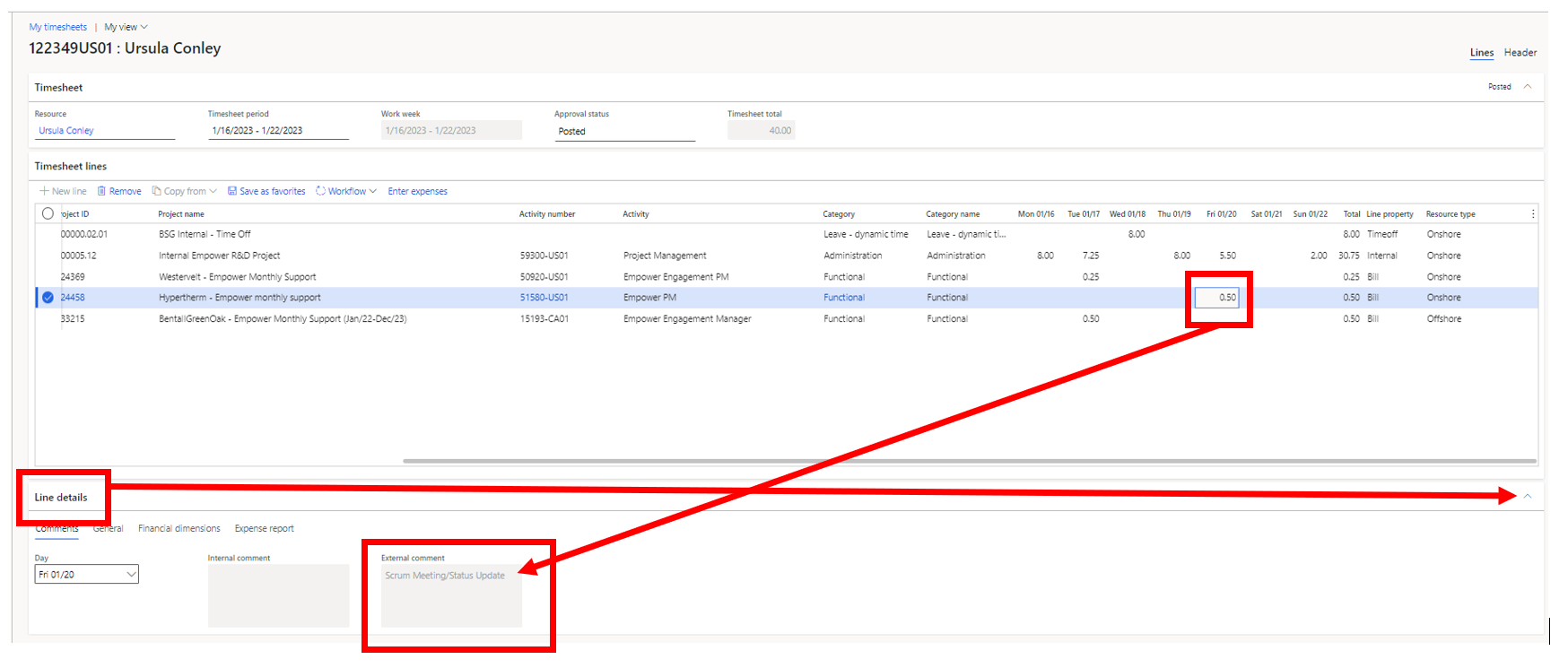
- Build a draft timesheet on Monday and then populate it daily with comments.
- This feeds the daily summary emails and keeps things timely. Only takes a few minutes and then Friday for timesheets is a breeze.
- Save your line items as favorites and create each week's timesheet from those favorites. It's easier to remove lines you don't need rather than enter each line individually. This also helps prevent mistakes. Check out this video on how to create your favorites:
https://hsdyn-my.sharepoint.com/✌/g/personal/uconley_hitachisolutions_com/EXoyLh7rFhxDpDc_-mMh5MABful96bdK-S93PpjygqSMDg?e=Gg1sJd - Editing your favorites (adding/removing/updating Activity Codes)
https://hsdyn-my.sharepoint.com/✌/g/personal/uconley_hitachisolutions_com/EdhS_1hm4kJGsHHD-AoXsSQBLQB8I70FHI7aFv5TyvKPZA?e=NjJtgF - Copying a previous timesheet:
https://hsdyn-my.sharepoint.com/✌/g/personal/uconley_hitachisolutions_com/ET48XSC5oGdIkdd92ipgOEgB3grD0xmf_-FwqRDmO5F-yA?e=bNb2vo
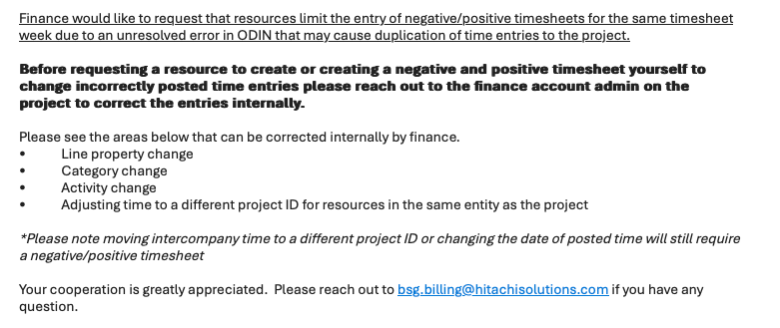
Make a mistake? Update a timesheet:
You will need to reverse a timesheet if you've done the following:
- Bill the wrong project
- Bill the wrong project task (activity code)
- Use the wrong Line Property (Bill vs NonBill)
- Billed time instead of time off
If you are needing to update a submitted timesheet, you MUST reach out to BSG.BILLING@Hitachisolutions.com.
Project Tasks
- Product Maintenance / Implementation Support / Training (expense)
- Bug fixing AFTER release when that bug is NOT handling new requirements.
- Planning (expense***)
- making decisions about the allocation of resources, determining functional requirements, and conducting supplier demonstrations.
- Planning for the practice or R&D effort. Agile ceremonies (Retrospective) can be counted here.
- Research (expense)
- Research not related to the creation of a product deliverable or documentation. For instance, a blog post.
- Project Management (expense)
- Managing the overall effort, similar to planning but specific to the product development calendar
- Maintenance
- Upkeep of existing software that is not an enhancement, break and fix work
- Design/Build/Test:
- Can include any activity including meetings and documentation related to developing the products. Not just strict to coding and testing. So, if there is an internal meeting (Standup, Refinement, Sprint Planning) to work on a design feature, it gets included. *A staff meeting would be excluded and would be counted as Planning
- Design/Build/Test Onshore (CapEx)
- Product Development / Refactoring
- Automated and Manual Tests
- Documentation / Development of Technical Material
- Bugs and Bug fix PRERELEASE
- Design/Build/Test Offshore (CapEx)
- Product Development / Refactoring
- Automated and Manual Tests
- Documentation / Development of Technical Material
- Bugs and Bug fix PRERELEASE
Spikes, Agile Ceremonies such as Standup/Refinement/Sprint Planning will be under Design Build Test
Retro under planning (just because we reflect and talk about what we can do better for future sprints)
Your submission may not be affected or change a lot - maybe the category will change but think about mtgs you may join that may be categorized under a different activity and/or category
UPDATE ON TIMESHEET SUBMISSIONS: As we review our allocation for the next fiscal year, we are asking the team to correctly fill in his or her timesheets with the correct activity/category that aligns with the work you do each day. (Billing to Clients is still fine for those that bills to them)
Note: Depending on your hours each day, we request that you do not go over 40 hours for the week unless you comment to the reasoning directly on the timesheet.
Examples below


Why do we have these buckets?
We need to have these buckets so that we can follow critical accounting rules under US G.A.A.P. and I.F.R.S. These buckets affect how the costs of the program are applied to our books. Correct treatment of hours is essential to the operation of our business.
What is Changing in Empower Phase III?
We have two projects we are billing to for Phase III.
- Internal Empower Phase III - All team members contributing to the D365 and Machine Learning workstreams will bill to Phase III. Also, any team members working on the Empower platform from a different Hitachi practice will bill to Phase III.
- Internal Empower R&D Project - All Empower team members working on and developing the platform will bill to the Empower R&D project.
Link to Microsoft Teams page instructions: https://teams.microsoft.com/l/channel/19%3A370bae034fb2494f8c754a230e67f37a%40thread.tacv2/tab%3A%3Aa06d77c8-2f17-48f4-b424-09337504a1c9?groupId=a55bc569-26de-429a-a3cd-3defeb0ea9d9&tenantId=e85feadf-11e7-47bb-a160-43b98dcc96f1&allowXTenantAccess=false